Building a Fantasy Environment from Scratch: Part I
What happens when you now give a team complete creative freedom to reimagine a fantasy environment?
Similar to our previous internal sci-fi environment project, a group of our talented artists came together once again to experiment with advanced techniques and push artistic boundaries.
What began as a training project for our artists evolved into a deep exploration of scale, storytelling, and world-building. In this two-part breakdown, we will once again take you behind the scenes to uncover how this ambitious project came to life:
- Part 1: Concept, Direction Finalisation & Asset Production
- Part 2: Environment Assembling + Final Touches
Each phase is explored in detail, with insights from key members who were instrumental in shaping the result.
In both articles, you’ll hear directly from Annamaria D’Arienzo (Concept Artist) and Fabio Nuzzo (3D Artist Supervisor), with a special cameo from Jeroen Jansen (Lead Environment Artist).
Special thanks to the rest of our incredible team for their passion and talent.
Let’s begin!
Vision behind the project
The main goal was to create a new piece for our portfolio, but this time, we wanted to explore something completely new: a large-scale outdoor environment with a fantasy core.
Anna: We wanted to challenge ourselves as artists and strengthen our skills in an area that’s becoming increasingly important in the game industry: vegetation and the complex software that supports it.
At first, we didn’t have a clear picture of where the project would go, but we drew inspirations from major titles like God of War, The Last of Us, and Wukong. We wanted to create capture their magnificent natural environments while creating something original to us at Forge.

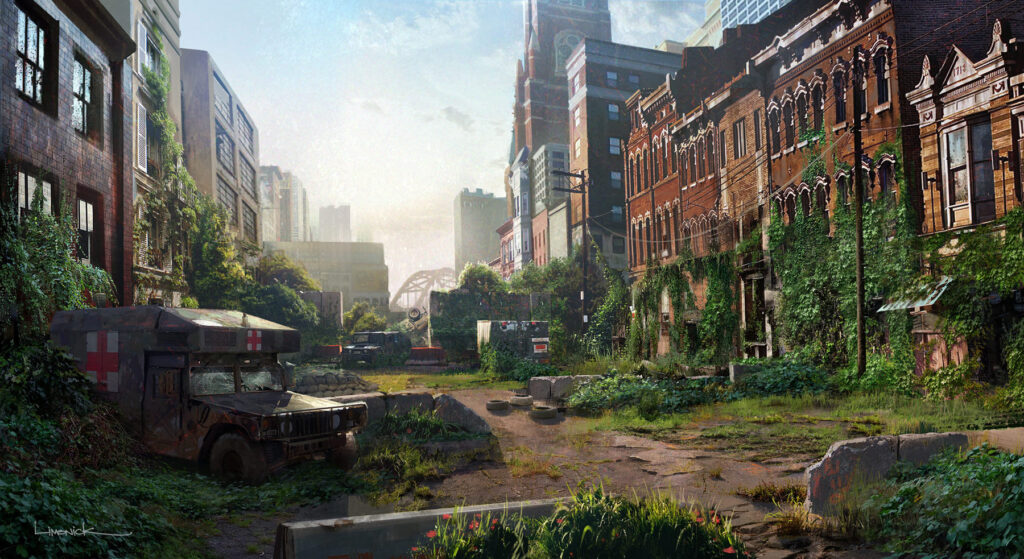
The Last of Us

Wukong
Pushing creativity and technical skills
Fabio: What excited me the most about this project was the change of setting. Although I’ve worked on many projects since I’ve been at Forge, it had been a while since I’ve worked on anything fantasy related. As a huge fan of this genre, I felt genuinely inspired.
“When you’re working on something you love, it fuels your creativity, and even when challenges came up, that connection made the process so much more rewarding.”
From Diorama to a fully realised world
Anna: It actually started as a small diorama focused on vegetation and a central tree. But, our enthusiasm took over, and it quickly grew into a full environment with its own visual identity, a 360° explorable path, and, above all, a story that went far beyond a simple diorama.
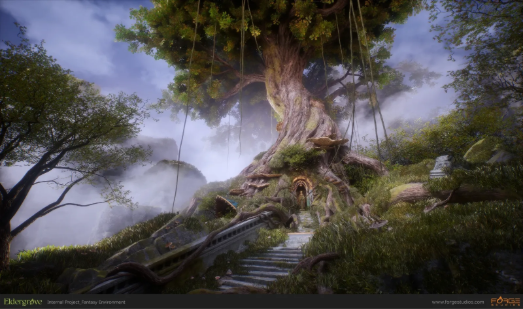
The process felt like assembling a large puzzle. We didn’t have a clear vision of the outcome at first, but piece by piece, it began to take shape. The giant tree was born, followed by the bridge, the arch, the statue, and finally the temple with its portico.
Having 3D artists involved from the beginning was invaluable. Their contribution to the blockout phase was crucial. It was one of the most complex parts of the project.
Choosing the right technical approach
Early in development, the team considered using Nanite in Unreal Engine, but ultimately pivoted back to a more traditional workflow.
Fabio: We were eager to test Unreal’s newer features, including Nanite. It’s a powerful tool for high-end environments, but one of our main goals was to let more artists gain hands-on experience.
Because since we had a rotation of team members and Nanite was still relatively new to us, we decided to go with a more classic approach using textures and trim sheets. It’s still one of the most reliable and widely used workflows in real-time 3D production, and it allowed us to move faster without sacrificing quality.
Building the assets
Creating large-scale outdoor assets came with its own set of challenges.
Fabio: The rocks, in particular, were one of the most technically demanding parts of the scene. It was my first time tackling large-scale assets like this, and I spent a lot of time with Federico, one of the artists who contributed most to this project, figuring out how to make them look great both from afar and up close.
That meant developing two different shader systems. The foreground rocks used a more complex shader with extensive customization options like adding moss, layering multiple normal maps, or using Unreal’s layering system. For distant rocks, we created a simplified version to keep performance in check.
It was a long process with plenty of iteration, but we were proud of the final result. Of course, I would have loved to optimize these shaders even more, but as with any project, time is the ultimate constraint.
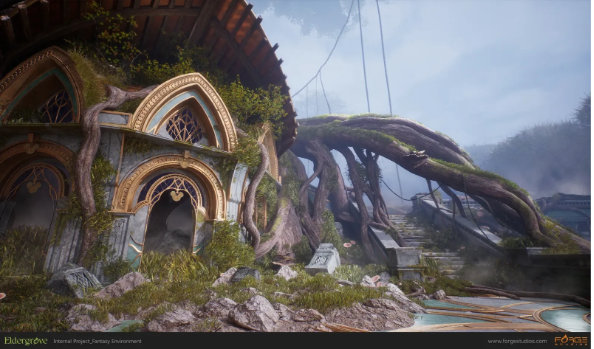
Bringing the vegetation and the tree canopy to life
The vegetation and the giant tree canopy became signature elements of the scene, both visually and technically.
Jeroen: The grass and the tree canopy were created using a similar approach. I started by building individual leaf and branch sprites, which were then arranged into a large sprite sheet. In Houdini, I extracted the sprites and built simple geometry cards around them, which I could group into various compositions.
For the canopy, I started with the base 3D model of the tree and used Houdini’s branch generator to create the larger branches. From there, I positioned the canopy sprites to build up the overall volume and form.
The entire setup was designed to be fully art directable. Almost every meaningful parameter was exposed, allowing control over the tree’s overall shape, branch count, height distribution, direction, position, and scale. This made it easy to iterate quickly, refine the composition, and strike the balance between structure and natural randomness.
Stay tuned for Part 2, where we explore how the team assembled the final environment, added the finishing touches, and brought Eldergrove to life! In the meantime, see the rest of our work on Art Station.